Tidenda

Editorial software

One tool, from one journalist to four hundred.

Write, edit and publish in one place. A solo journalist can be running instantly. A larger newsroom sets up its own editorial workflow, wire coverage and AI - matching how the desk already works.

Two shapes

The same tool for a single journalist or a national newsroom.

A solo journalist wants to write and publish without a training course. A larger newsroom wants a planning desk, an editorial workflow, permissions and an audit trail. Tidenda gives you both. A single setting decides which shape your team sees, and you can switch it at any time.

One-person publications

Simple mode. Write, edit, publish.

Planning and workflow controls stay out of the way. A solo reporter or a two-person newsletter can start writing straight away.

Larger newsrooms

Planning mode. Assignments, desks, deadlines.

Plan the day as a list of stories and assignments. Each article moves through the workflow your newsroom defines, and permissions decide who can move it forward.

Editorial surface

Everyone edits together, on any screen.

Headlines, article text, bylines, planning items, tags - everything the newsroom edits happens live. You see each other's cursors as you type, and each person's undo history is their own, so nobody wipes anyone else's work by accident. The same layout adapts from a reporter's phone in the field to a four-monitor desk, without a separate mobile app.

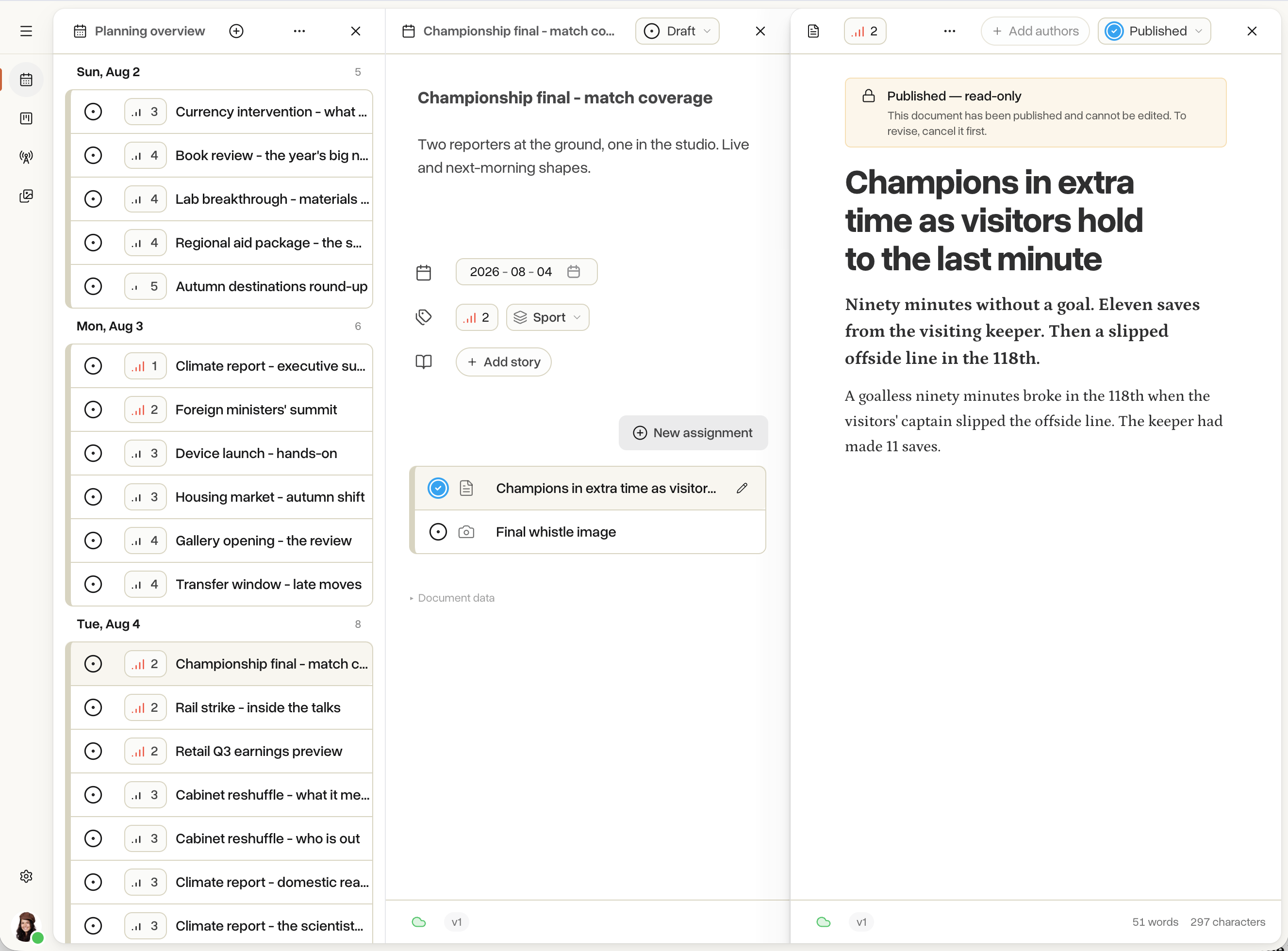
Planning overview, a planning item and a published article, side by side in three panes
Everyone in the same documentTwo editors can rewrite the same paragraph at the same time and neither loses their place.
Your workflow, your rulesDraw your own draft, review and publish steps, then decide which roles are allowed to move an article from one step to the next.
Fits a phone. Expands on the desk.On a phone in the field, everything a reporter needs is one tap away. On a four-monitor desk it spreads into planning, article and preview panes at the same time. Same interface, no separate mobile app, no stripped-down view to switch between.

Wires and AI

Wires arrive categorised. AI translates, summarises and rewrites where you want it to.

Subscribe to Reuters, TT, AP or an in-house feed. Wire items land already tagged with an IPTC topic and a priority. Any step in your workflow can trigger AI - translate a wire, summarise it, or rewrite it in your house voice - so a draft is on the editor's desk ready for a human pass.

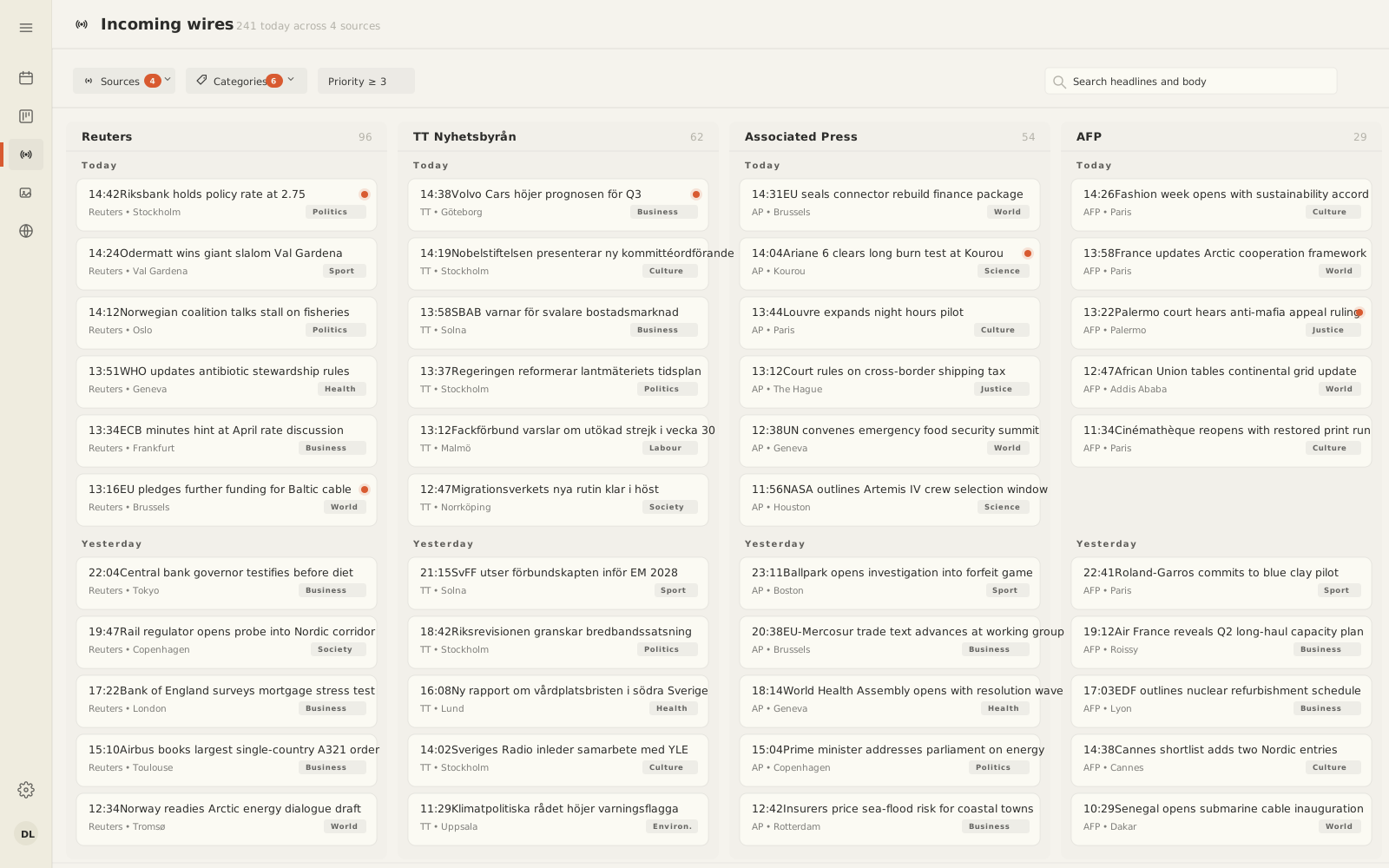
The newswires view with source and category filters and a list of incoming items

Wire ingest

Reuters, TT, AP or your in-house feed.

Wires land as drafts, categorised and prioritised on arrival. The ember dot marks items where AI is still working; everything else is ready for a human pass.

AI in the workflow

Runs only where you say.

Pick a workflow step - "when a wire lands", "when an editor approves" - and choose what should happen: translate, categorise, rewrite or summarise.

Bring your own provider

OpenAI, Anthropic, Mistral, or local.

Any compatible service, or the models bundled with Tidenda that run locally at no per-request cost. API keys stay inside your organisation.

Assets

A built-in library. A signature on every image.

Photographs, illustrations and graphics live inside the newsroom, next to the articles that use them. Captions, rights and photographer credit stay attached wherever the image travels. Every upload gets an Ed25519 signature so anyone republishing downstream can prove it has not been altered. If a file arrives with a C2PA manifest, we validate it and pass it through untouched.

People waiting on a train station platform

Photo by PJH on Unsplash

Publisher

A live site, one click away.

Turn on the publisher and your organisation has a working public site immediately. No servers to run, no build to configure, no separate stack to maintain. When you are ready, point your own domain at it - add a DNS record and we handle verification and HTTPS certificates for you.

Or your own site

Already have a site? Point Tidenda at it.

Running WordPress, a custom CMS, or a static-site generator? Every time an article is published, Tidenda sends a signed snapshot to the endpoint you name. Your existing site keeps its templates, its URLs and its ops - it just gets clean editorial content from a proper editorial tool. Use the built-in Publisher, your own stack, or both side by side.

Signed article payloads

Every delivery carries the full article JSON plus embedded assets, HMAC-signed on the request and Ed25519-signed on the snapshot. Verify in any language.

Idempotent, replayable

Retries carry the same delivery id, so your receiver is safe to make idempotent. Any past delivery can be replayed from the admin UI.

1

Tool for the whole newsroom

Planning, writing, wire coverage, AI, images, and a public site - one place, one login.

0

Servers to run

The publisher, the collab surface, and the wire ingest are managed for you. Point a DNS record and you have a live site.

1 yr

Free for the first seat

Sign up, publish an article, invite a colleague. Payment starts on the second seat, and only after your first year.

Integrations

Plug into the systems you already run.

When an article moves through your workflow, a webhook fires and lets your systems - a print system, an archive, an analytics pipeline - react. Every delivery is cryptographically signed, so receivers can verify it came from you. Failed deliveries retry automatically, and any event can be replayed from the admin UI. If you need to push content the other way round - wires, planning items, articles - a scoped API key does the work.

Signed outbound webhooks

Each delivery is signed HMAC-SHA256 on the request and Ed25519 on the article snapshot. Receivers verify authenticity in any language. Deliveries are idempotent and replayable.

Webhook docs

Content injection API

Push documents into your organisation via a scoped API key. Good for custom wire importers, upstream editorial systems, and migrations from a legacy tool.

API reference

Ready when you are

Ten minutes to know if it fits your newsroom.

Sign up, publish an article, invite a colleague. The first user is free for a year.